Skip to content
K3YHOLD

MaintenanceTech for Owner-Operators

Keep the control. Stop making the calls.

You are the owner and the property manager — at 2 a.m., too. MaintenanceTech takes the legwork: the tenant’s report and the follow-up call, finding a repair company, booking the visit, and a written record of all of it. Anything at or over your spending limit waits for you.

Join the Arizona beta

Real recording · recorded line · demo persona

A real AI maintenance call, start to finish

2:24Recorded Aug 14, 2026

The AI is genuine K3YHOLD product audio. The caller is a demo persona on our own validation line — no third party was dialed. The video is condensed for time; the transcript is complete.

The record

  1. Caller at 08:49

    Hello.

  2. K3YHOLD AI at 08:49

    Hi, this is the K3YHOLD AI assistant calling about the maintenance request you submitted today. Just so you know, this call is recorded for quality and training. Before we get into the details, can you confirm your 4-digit PIN to verify it's you?

  3. Caller at 08:49

    [reads their 4-digit PIN]

  4. K3YHOLD AI at 08:49

    Thanks, Miguel. Let’s go through a few quick questions to get all the details right. First off, when did you first notice the slow draining and leaking under the sink—was it today, a few days ago, or longer?

  5. Caller at 08:49

    It was last night.

  6. K3YHOLD AI at 08:50

    Got it. And since last night, have you noticed if it’s getting worse, staying the same, or coming and going?

  7. Caller at 08:50

    It stayed about the same, it just smelled real bad.

  8. K3YHOLD AI at 08:50

    That smell must be really unpleasant. Let's get this moving for you. Have you tried anything to fix it yourself so far?

  9. Caller at 08:50

    I tried putting Drano in it. It didn't do anything. I tried lightly plunging it, I don't know if that's good or bad, but that didn't help.

  10. K3YHOLD AI at 08:50

    Thanks for sharing that. Is there anything that seems to make the issue worse—like a certain time of day, running water elsewhere, or changes in the weather?

  11. Caller at 08:50

    When I run the dishwasher, it definitely makes everything a lot worse.

  12. K3YHOLD AI at 08:50

    Good to know. Now, is there anything the vendor should know before they come out—like pets, parking, gates, or times to avoid because of meetings or work-from-home?

  13. Caller at 08:51

    Yes, we have a dog but I'll lock it up. Also there's a security gate—so the vendor just has to buzz my unit number.

  14. K3YHOLD AI at 08:51

    Thanks for that. Now, last thing—let’s confirm your availability. We don’t have any preferred time windows on file yet. When would work best for the vendor to come out—mornings, afternoons, or evenings on certain days?

  15. Caller at 08:51

    Anytime today would be great, or anytime Saturday or Sunday.

  16. K3YHOLD AI at 08:51

    Got it. We've noted: Friday afternoon today, and any time—morning, afternoon, or evening—on Saturday and Sunday.

  17. Caller at 08:52

    Yes, that's correct.

  18. K3YHOLD AI at 08:52

    Perfect, thanks for confirming. So to summarize—plumbing issue at 12B, noticed last night, smells bad, and running the dishwasher makes it worse. You’ve tried Drano and plunging. There’s a dog that’ll be locked up, and the vendor should buzz your unit at the security gate.

  19. Caller at 08:52

    Yes, that's correct.

  20. K3YHOLD AI at 08:52

    Anything else you'd like me to add before I hand this to your property manager?

  21. Caller at 08:52

    No, that's all.

  22. K3YHOLD AI at 08:52

    Perfect, thanks for taking the time. Your PM will be in touch soon—have a good rest of your day.
Arizona beta· Seeking pilot and design partners

Owner-operator + Tenant

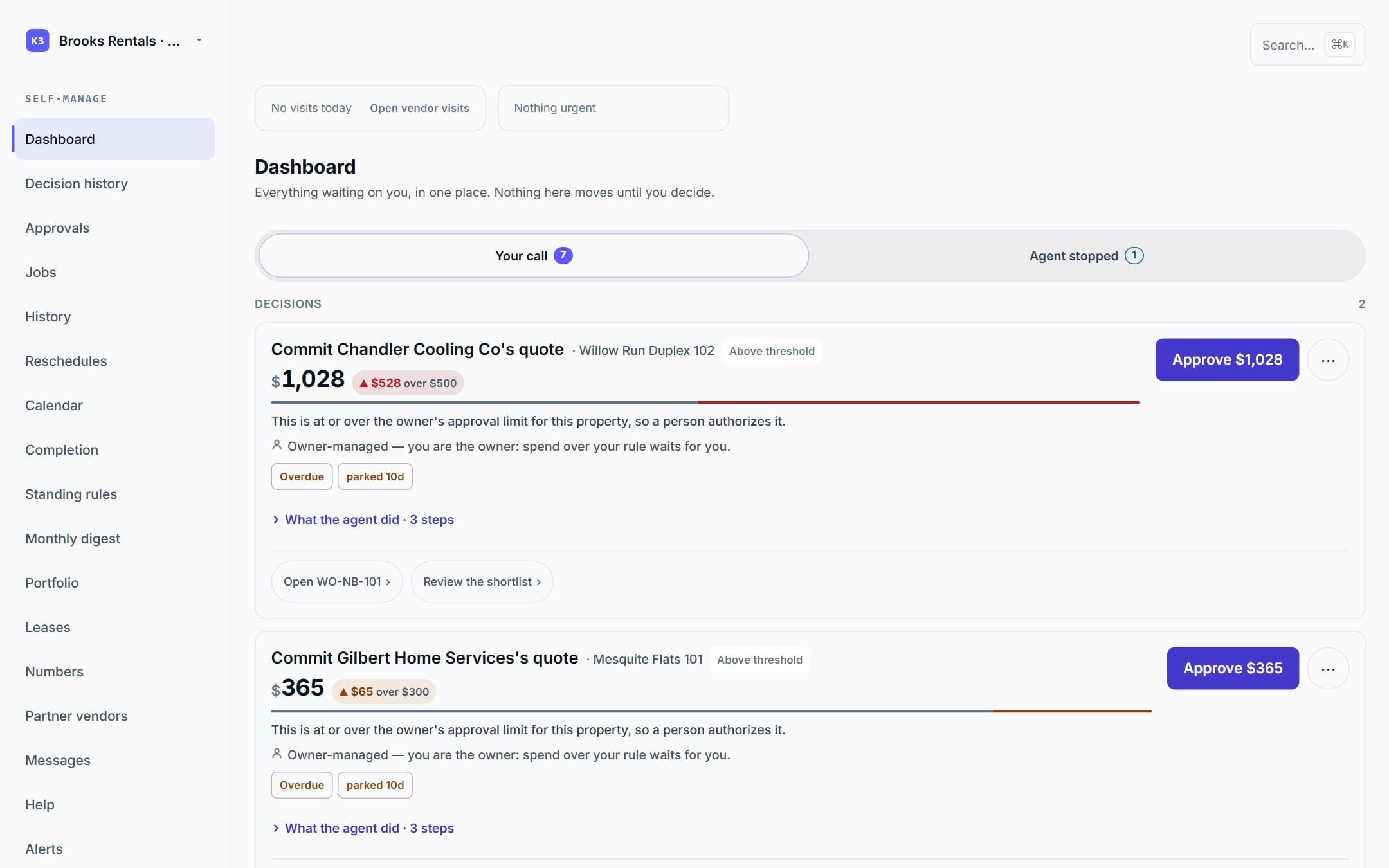
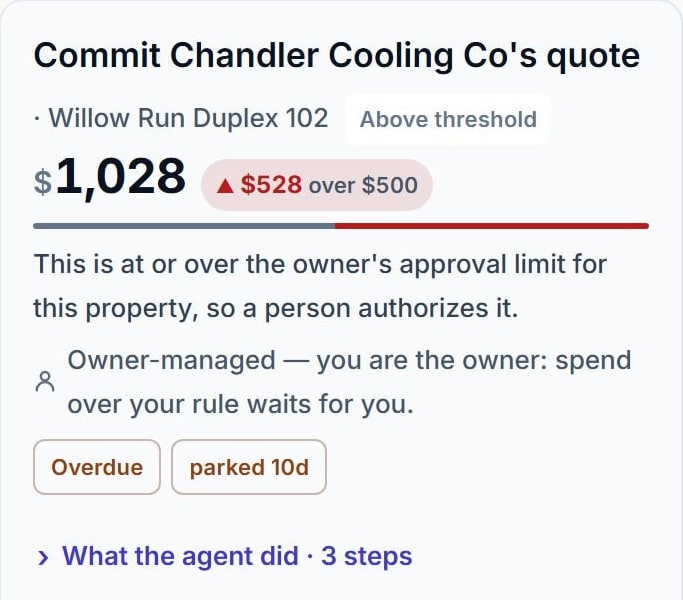
A decision card: commit Chandler Cooling Co's quote, $1,028 — $528 over the owner's $500 limit, so a person authorizes it.
Real product screen · demo data

The AI does the legwork. A person makes every money decision.

When the work reaches a risky step — like spending at or over an owner's limit — it stops and waits for a recorded human decision. Owners can approve small repairs ahead of time with their own spending rules; that is still a person's choice, made in advance.

01 · How it works

One repair, start to finish.

Every screen is the real product with demo data; every step works today.

  1. 01Works today

    The tenant reports it, in their own app.

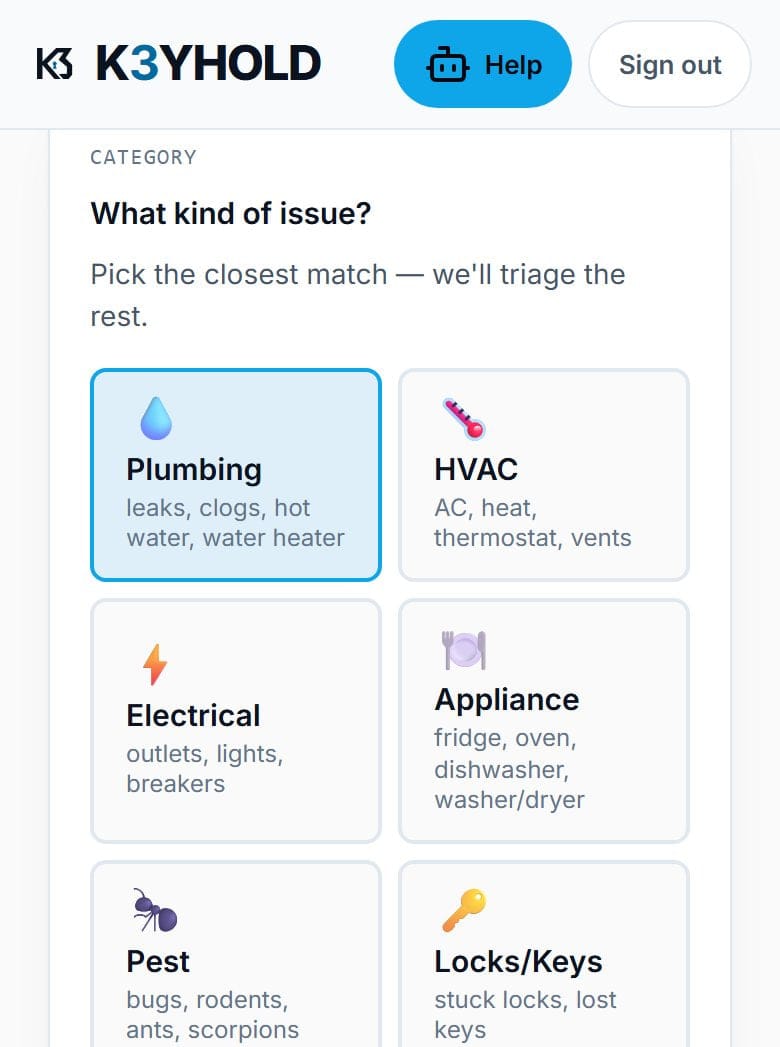
    A guided form: what kind of issue, the problem in their own words, whether a vendor may come in while they're out, and a required photo or video. The urgency they pick is a signal — the manager sets the final priority.

    MaintenanceTech tenant app: the report-a-problem form, with the kind of issue picked from plumbing, HVAC, electrical, appliance, pest and locks, then a box for the problem in the tenant's own words.

    Real product screen · demo data

  2. 02Works today

    The AI calls — and says it's an AI.

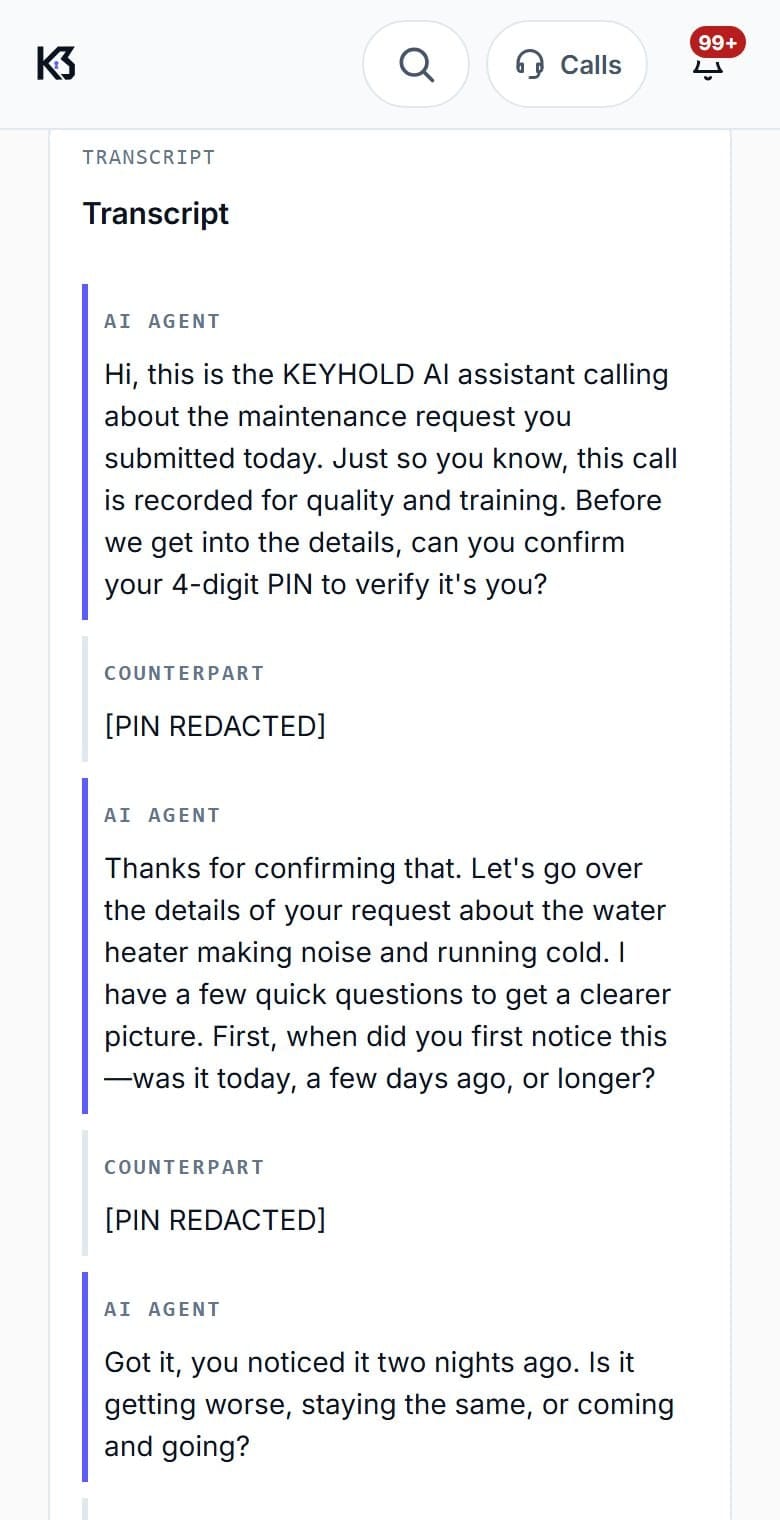
    The first sentence of every call discloses the AI and the recording, then verifies the caller with a PIN. Every word is kept as a transcript the manager can read live or review later.

    A MaintenanceTech call transcript: the AI opens by identifying itself and noting the call is recorded, then asks for a PIN, which is shown redacted.

    Real product screen · demo data

  3. 03Works today

    It finds the vendor — your trusted ones first.

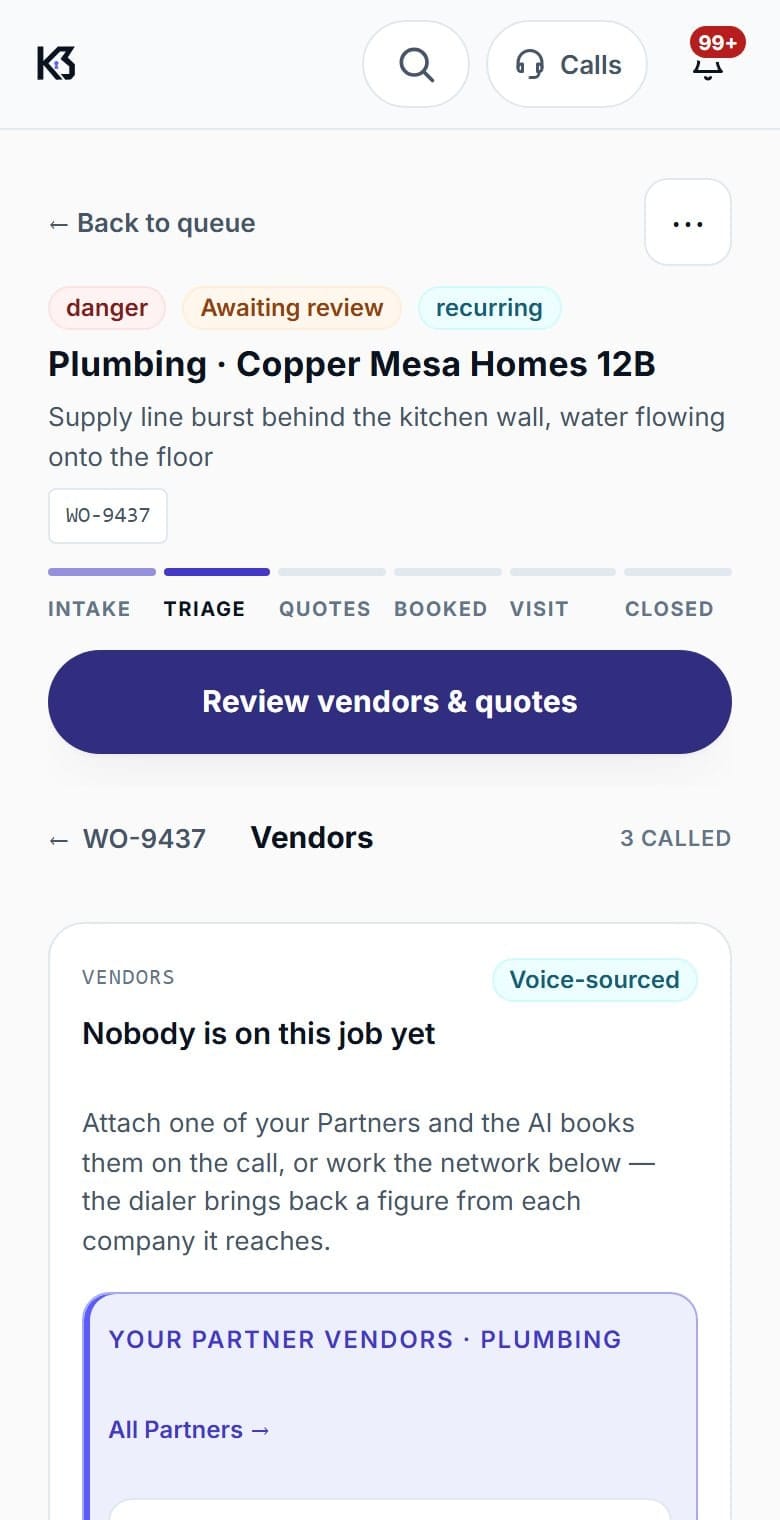
    The manager's own Partner vendors are offered first. “Attach & call” books one in a single motion; the AI gets a price and a time. Licensed and insured stay two separate answers.

    A MaintenanceTech work order for a plumbing emergency, showing the six-step tracker at Triage and the Partner vendors section ready to attach and call.

    Real product screen · demo data

  4. 04Works today

    The owner decides the money.

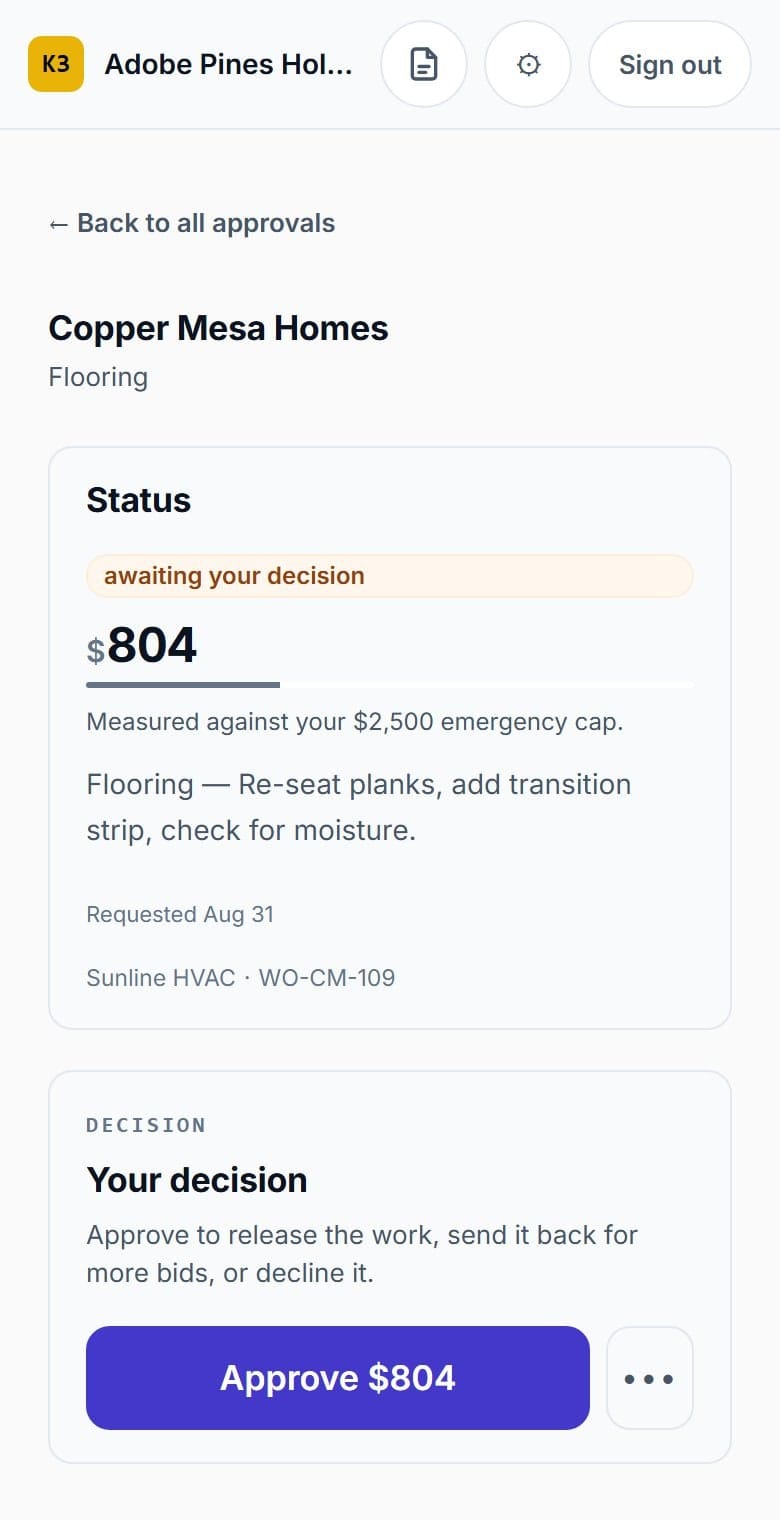
    At or over the owner's limit, the job parks. The owner sees the exact amount and approves, asks for more bids, or declines — in the app, or on an AI call after giving their passcode.

    MaintenanceTech owner app: an $804 flooring repair awaiting the owner's decision, with an Approve button and options to send back for more bids or decline.

    Real product screen · demo data

  5. 05Works today

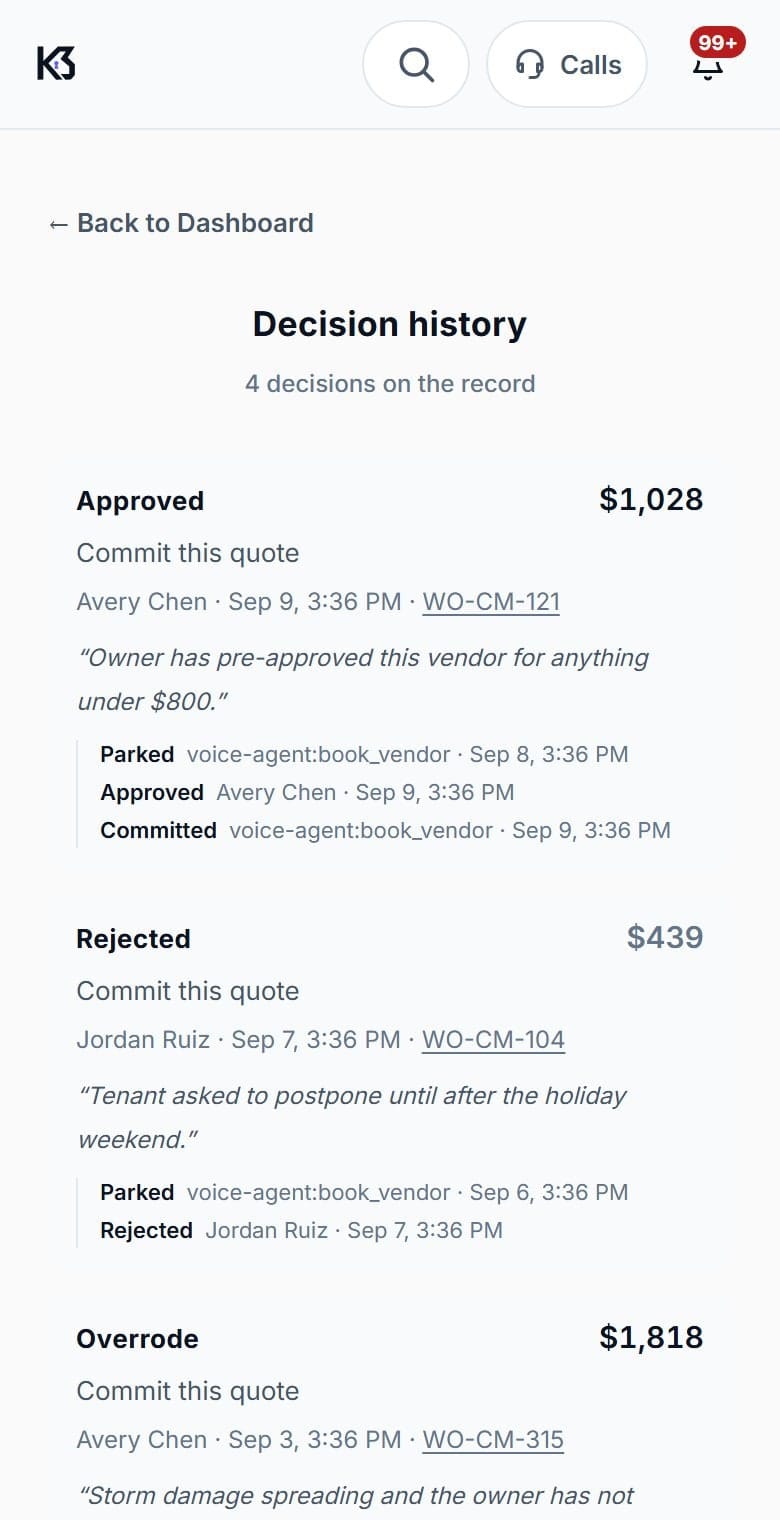
    Every decision is on the record.

    Who decided, what, and when — kept permanently, and exportable. The manager can pause the AI for one job or the whole company at any time.

    The MaintenanceTech manager dashboard history view listing what was decided on each job and by whom.

    Real product screen · demo data

02 · Your call

It works the job. You decide the money.

The AI books, chases and confirms on its own. When the number crosses the line you set, it stops — and the job sits here until you say otherwise.

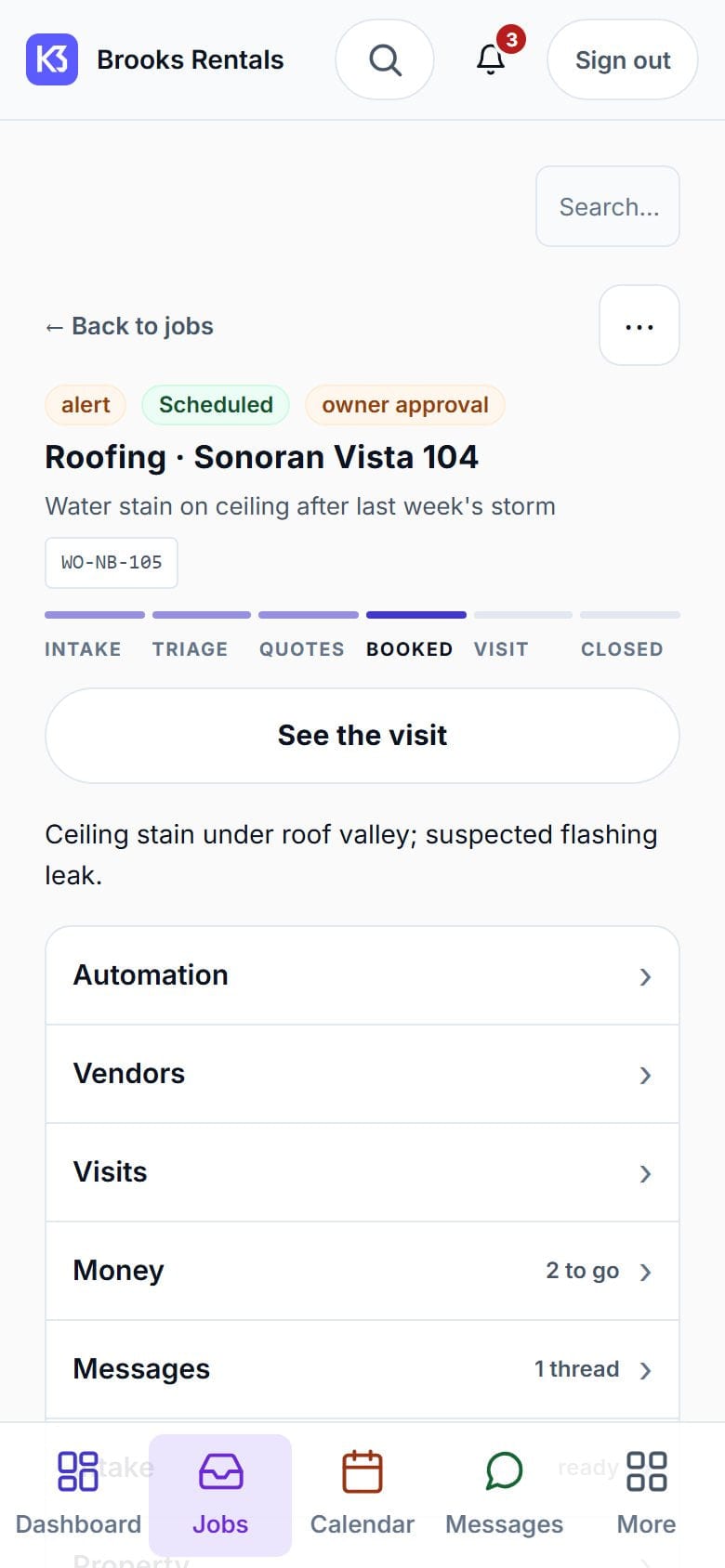
01The job

A job page: roofing at Sonoran Vista 104, water stain on a ceiling, with a six-stage tracker at Booked and sections for automation, vendors, visits, money and messages.
What it is, where it stands, what happens next — one page per repair.Real product screens · demo data

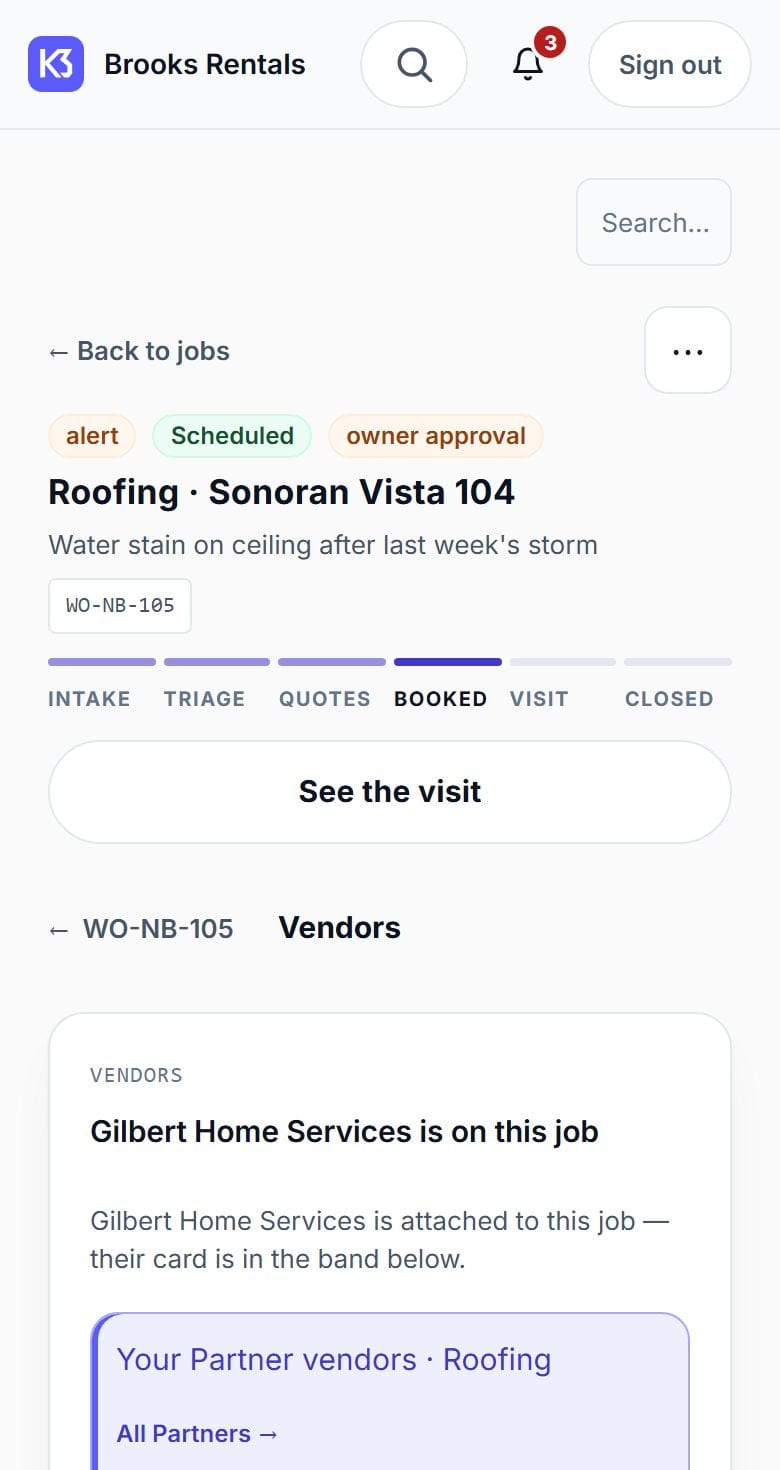
02The vendors

The vendors section of a job: the repair company attached to the job, your own Partner vendors for that trade, and the network vendors the sourcing screen can find.
Your own trusted companies first. Others only if none of them fit.

03Your decision

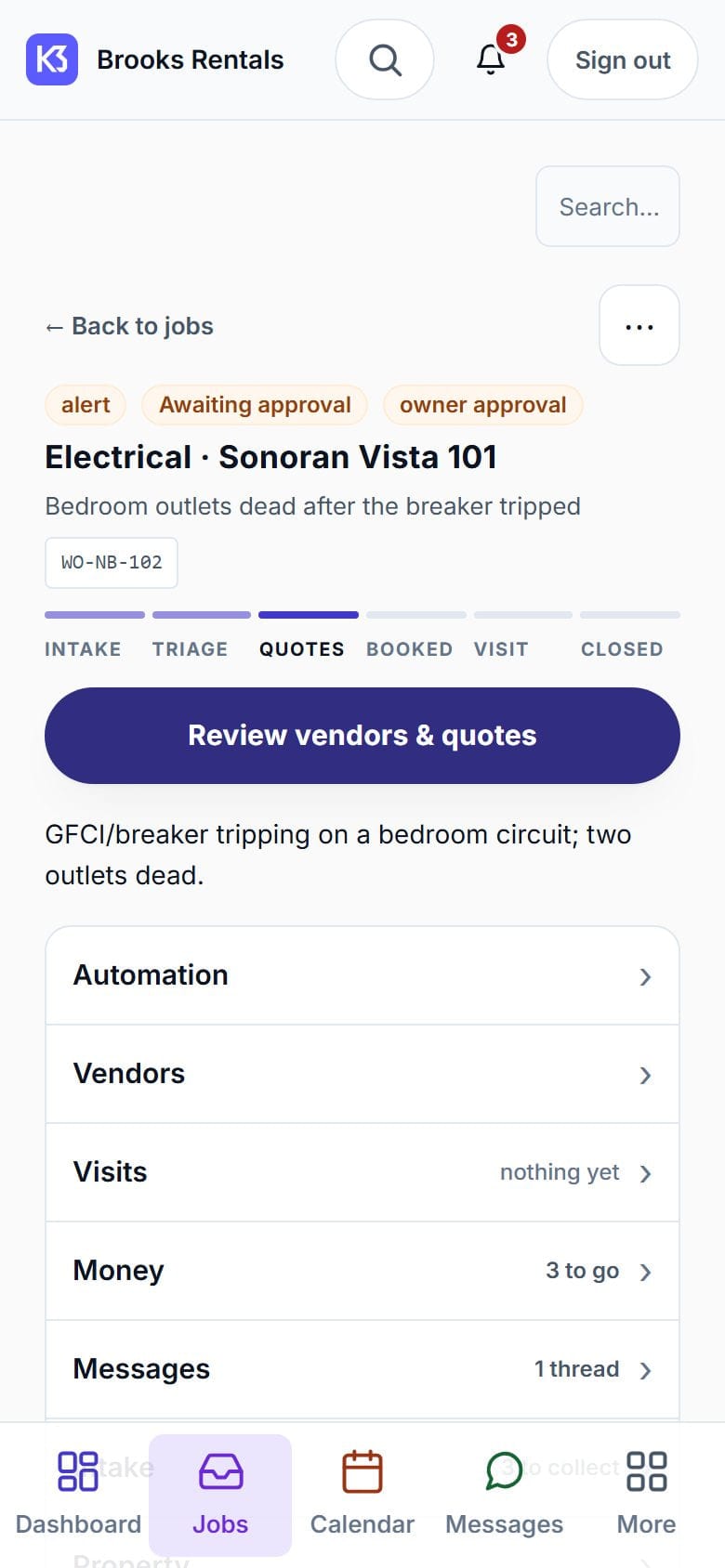
A job held at the Quotes stage with an owner-approval flag, waiting on a decision before vendors and quotes are committed.
Over your limit, so it waits. Nothing is booked until you say so.

Or decide once, in advance.

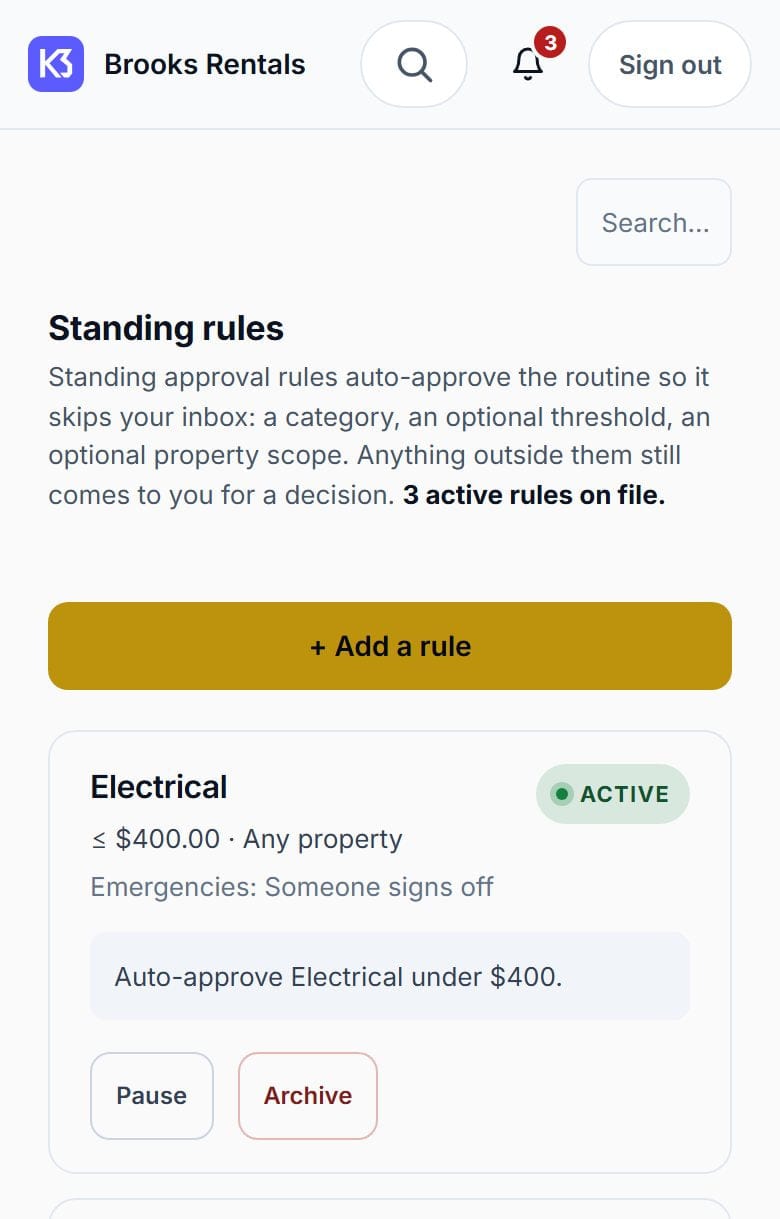
A standing rule pre-approves the routine so it never reaches your inbox: a trade, a threshold, an optional property. Anything outside the rule still comes to you.

That is still your decision — made once, in advance, and on the record like any other.

Standing rules: three active rules that auto-approve electrical under $400, general maintenance under $300 and HVAC under $500, each with a pause and archive control.
Real product screen · demo data
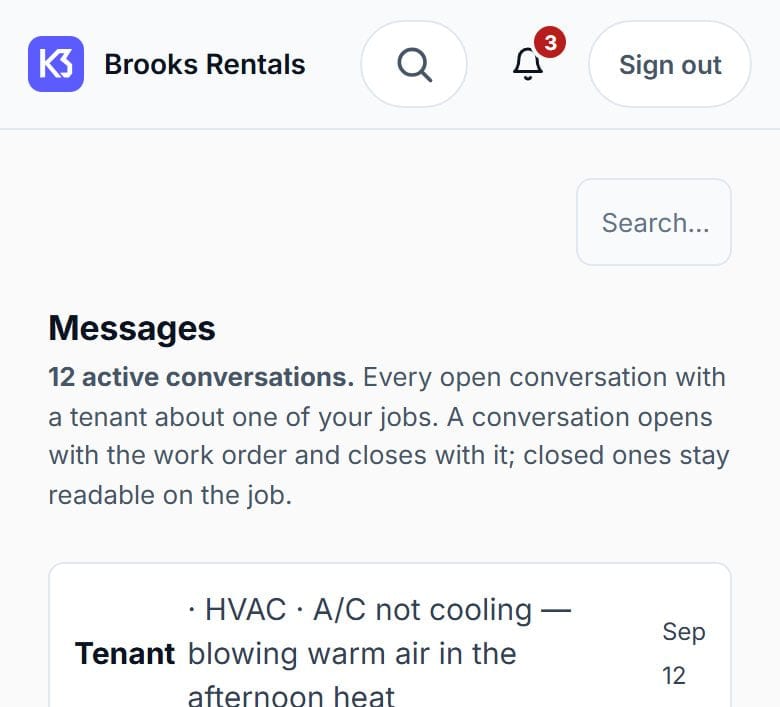
Messages in the owner-operator app: private threads with tenants, each attached to a job.
Real product screen · demo data

03 · The tenant

They report it. Someone answers.

The tenant reports the problem in their own app, with a photo, and the AI calls to fill in what is missing. From then on they are told what is happening without either of you chasing the other.

04 · What you get

Everything, labelled.

What works today, what is built and switched off, what is coming, and what we do not offer by design — checked against our own capability record, as of September 21, 2026.

  • One dashboard, two piles: “Your call” and “Agent stopped”

    What needs your decision, and where the AI paused itself rather than guess.

    Works today
  • Every repair job across all your properties

    Where each job stands, and what's next.

    Works today
  • AI calls to tenants and repair companies

    Intake, price checks, booking and follow-up — each call reviewable with a full transcript.

    Works today
  • See how vendors were shortlisted

    A preview of the repair companies the AI is weighing up for a job, and how the list was ranked.

    Works today
  • Your money rule, in one place

    Set spending limits; a PIN or Face ID before a final bill or parked spending goes through.

    Works today
  • One helper, six switches

    Add one person and choose exactly what they can do: money, emergencies, jobs, people, portfolio, reports. All start off.

    Works today
  • The 2 a.m. chain rings you directly

    And your helper too, if you've switched emergencies on for them.

    Works today
  • On your phone's home screen, with push alerts

    Installs from the web — no app store. Read-only offline mode for jobs you've opened.

    Works today
  • Data export

    One download of your records.

    Works today
  • Adding a single property by hand

    Add one property at a time, or import a whole portfolio from a spreadsheet.

    Works today
  • Text messages to tenants and vendors

    Updates by text, alongside email, in-app and push.

    Works today
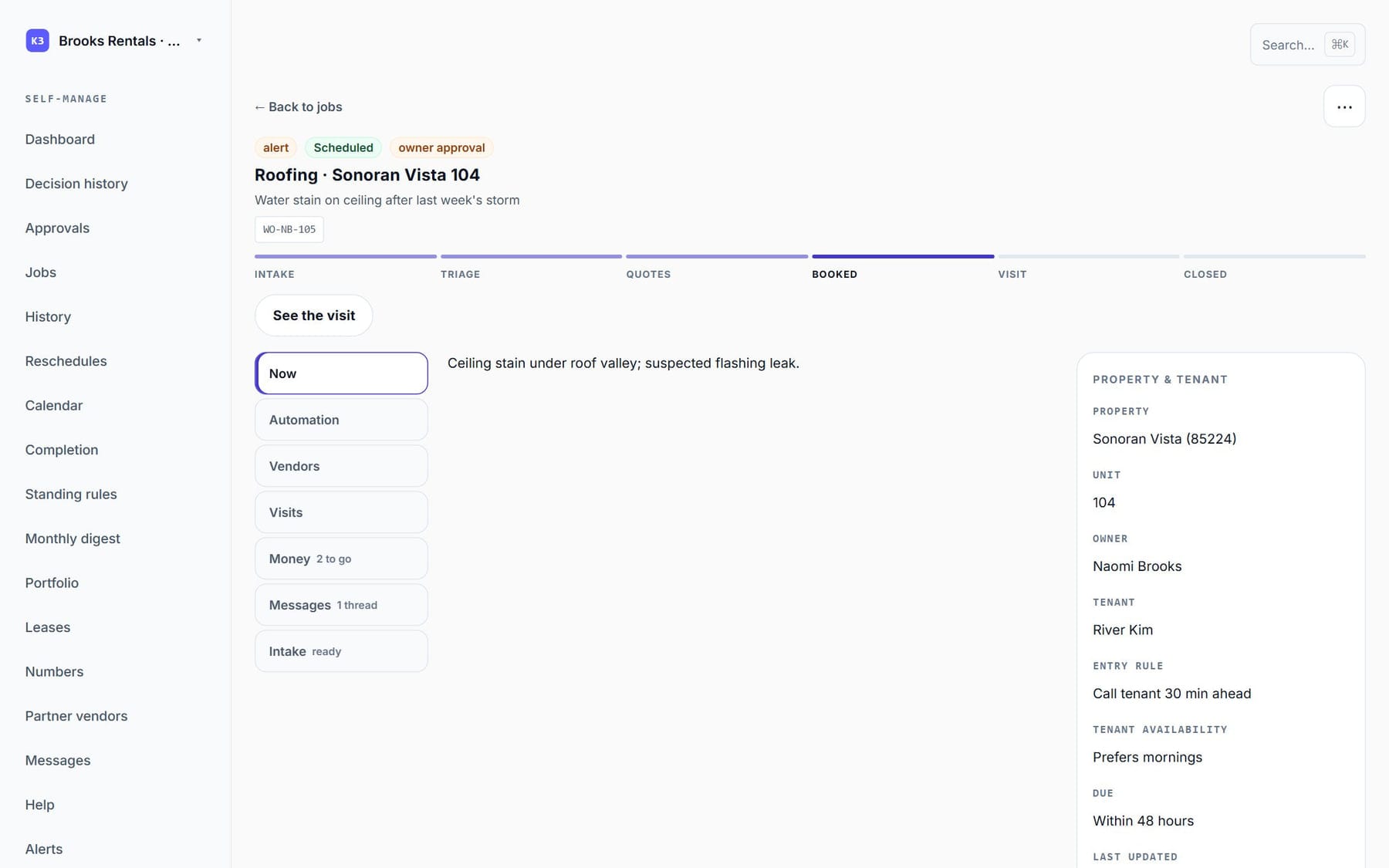
A job on a computer: the stage tracker, the automation panel, the vendors and the money section side by side in one view.
The same job on a computer, when you would rather work at a desk.Real product screen · demo data

05 · The calls

Real calls, with written rules.

Tenant intake, price checks, bookings, confirmations, follow-ups, your own approval calls and after-hours emergencies. Each kind has written rules for what the AI may say and do.

  • Every call opens by saying it is an AI and that the call is recorded.
  • You can follow any call live, as text, and read every word after.
  • You set the hours you are willing to be called in, and so does each of your tenants. Calls to repair companies use business hours unless you set different ones.
  • A vendor who says “stop calling” goes on a do-not-call list for every company.

Excerpt from a real recorded K3YHOLD AI call (demo persona on K3YHOLD’s own validation line). Read the full transcript.

06 · Questions

Questions owners ask.

Who is this for?

Owners in Arizona who run their own rentals with no outside property manager. The Arizona beta is open and we're seeking pilot and design partners. It isn't general sign-up, so tell us about your operation and we'll be in touch.

I only have one or two rentals. Is that too small?

No. Add a single property by hand, or import a whole portfolio from a spreadsheet — whichever suits how you keep your records.

Can I use MaintenanceTech today?

Not on general sign-up. Both MaintenanceTech offerings — for owner-operators and for property managers — are in an Arizona beta that's open now — we're seeking pilot and design partners. The software itself runs the whole repair loop today.

Does the person on the phone know they're talking to an AI?

Yes. The first sentence of every call says it is K3YHOLD's AI and that the call is recorded, and it can't be cut short. After each call, the system checks that the opening was actually spoken.

Will the AI spend an owner's money on its own?

No. Every dollar traces back to a person — either someone approved it, or the owner set a spending rule ahead of time. Any quote at or over the owner's limit stops and waits for a person to decide.

Does it connect to AppFolio or Buildium?

Not with a live two-way link yet. Today MaintenanceTech hands information off as an exported file, and a live link is on the roadmap. You can also download a copy of your records at any time.

Will my tenants get text messages?

Yes. Updates can go by text, alongside email, in the app and by push notification.

What does the AI do if something is genuinely dangerous?

It tells the tenant to get themselves to safety and contact the right emergency service first, and it says so before anything else. It never contacts an emergency service itself, and it never tells anyone that help is on the way.

Are calls recorded? For how long?

Yes, both sides. Audio is kept up to 90 days, and a company can choose less; emergency jobs and calls under a legal hold are kept longer. Written transcripts and decisions are kept longer than audio.

Does it work in more than one language?

Yes. Tenants can be set up in the language they actually use, so the app and the calls reach them in it.

What does it cost?

We aren't publishing pricing during the Arizona beta. We'll talk it through when you get in touch.

See it on your own rentals.

The Arizona beta is open — we're seeking pilot and design partners.